Salesforce meeting prep
Prepare for your next sales meeting from a Salesforce record
Most reps do the same thing before an important sales call or meeting: They go to the person's Salesforce record, then a dozen browser tabs to learn their job title today, what they posted recently, the last interview they did, and if the company was mentioned in the news. The research helps, but it is hard to scan or revisit, and seldom saved in a location the rest of the team can access.
WhiteBridge is AI meeting preparation, made on the record. Open a Lead, Contact or Opportunity. Click once, and in 3-5 minutes you'll have a brief on the person: who they are, what they've said publicly, how they're inclined to evaluate a proposal, and what's worth asking them. Each bit of information links to a public source, and the brief is saved against the record.
How the research runs from the record
The panel is available on Lead, Contact, and Opportunity record pages by default, and your Salesforce administrator can add it to any other standard or custom object. When a rep creates a brief, the person's name, work email, and any public profile link that exists on the record are pre-populated. That's all WhiteBridge gets, and no other data from the record is transmitted.
- Account
- Example Logistics Group
- Stage
- Proposal
- Close date
- 15 Dec 2026
- Contact role
- Nora Belmayne, Decision Maker
 WhiteBridgeShared credits
We checked 47 publicly available data sources
- Check the person. The system auto-populates the fields from the record. You can edit them or include the link to a social profile prior to beginning.
- Verify the right match. WhiteBridge searches for matching profiles across networks and prompts you to choose the correct one so that a namesake won't go in your brief.
- Receive the brief. This takes 3 to 5 minutes, and you are welcome to leave the record or the tab while it works on the brief, because the brief auto-saves to the record when complete.
- Use it for the call. This brief remains on the record, and you can access the complete report as a PDF file that you can download to read before the call.
- 1Open the recordLead, Contact or Opportunity; name, work email and profile link come pre-filled
- 2Confirm the personPick the matching profile so a namesake is not researched
- 3GenerateOne click; ready in 3 to 5 minutes, and you can close the tab
- 4Read and saveThe brief is stored on the record; the full report is also a PDF
The only thing that triggers this is your rep's request. We don't generate any briefs unless an assigned user requests it, and we keep a record of that request by user name. There's no nightly scheduled job that updates your database, so the only people you'll get briefs on are those your team is meeting with, and you'll know who asked for each one.
What a meeting brief looks like
A fictional example brief, reduced for this page. Person and company don't exist. The real brief, with the number of public sources, lists what was found in 4 categories: About Them, Icebreakers, Persuasion Tactics and Personality Insights. Every line lists the source and date so the rep can look up the original before passing it along in the meeting.
We checked 47 publicly available data sources
About Them
- Moved from carrier operations into procurement in 2021; now leads vendor selection for road freight. Company website, team page
- Has said publicly that supplier onboarding takes too long and that she wants it under 30 days. LinkedIn post, 9 Sept 2026
Icebreakers
- Spoke on a panel about carrier data quality at a regional logistics event. Event agenda, 14 Oct 2026
Persuasion Tactics
- Asks for references from shippers of a similar size before she shortlists a vendor. Podcast interview, June 2026
- Responds to proposals that show the rollout plan, not only the price. Conference talk recording, March 2026
Personality Insights
- Observed pattern: short, direct posts; replies to comments with numbers rather than opinions. LinkedIn activity, 2026
Read it like you'd read notes from a coworker. About Them gives you their background and what they say that they value now. Icebreakers offer up the newest, most specific detail for the first minute. Persuasion Tactics and Personality Insights are observed behaviors derived from what your prospect publishes and responds to, not a personality test, and each one names its source. Where there is little public footprint to go on, the brief explains that.
Questions are often the first thing a rep leads with. Based on the fictional brief in the above example, a rep may ask these questions to start:
- In September, you wrote about streamlining supplier onboarding to less than 30 days. How is the project going, and what is it stuck on?
- When you are shortlisting a vendor, which customer references matter most to you, and what questions do you pose to those customers?
- Who on your side also wants to review the rollout plan prior to approving the proposal and what would they look at first?
Here's how you can frame these types of questions based on what the prospect has said publicly - so they sound authentic. Use these questions as a starting point and adapt based on what you already learned during your calls and emails.
Two meetings where a brief helps
A first call with someone new
A Lead comes in from a webinar, with a call tomorrow. The record has a name, work email address, and job title, and not much more. A quick brief run from the Lead gives the rep someone's work history, what they've written or posted in public, and a couple of good conversation starters linked to that activity. The rep enters the call with 2 or 3 targeted questions about their challenges.
A buying committee meeting
When the more complex deals are at stake, there are multiple people involved in the decisions and each of them interprets the proposal differently. On an Opportunity, you can produce a separate brief for each member of the buying committee, one at a time, where each brief contains its own sources and date. Teams who maintain Opportunity Contact Roles will see the committee in one place and who still needs a brief.
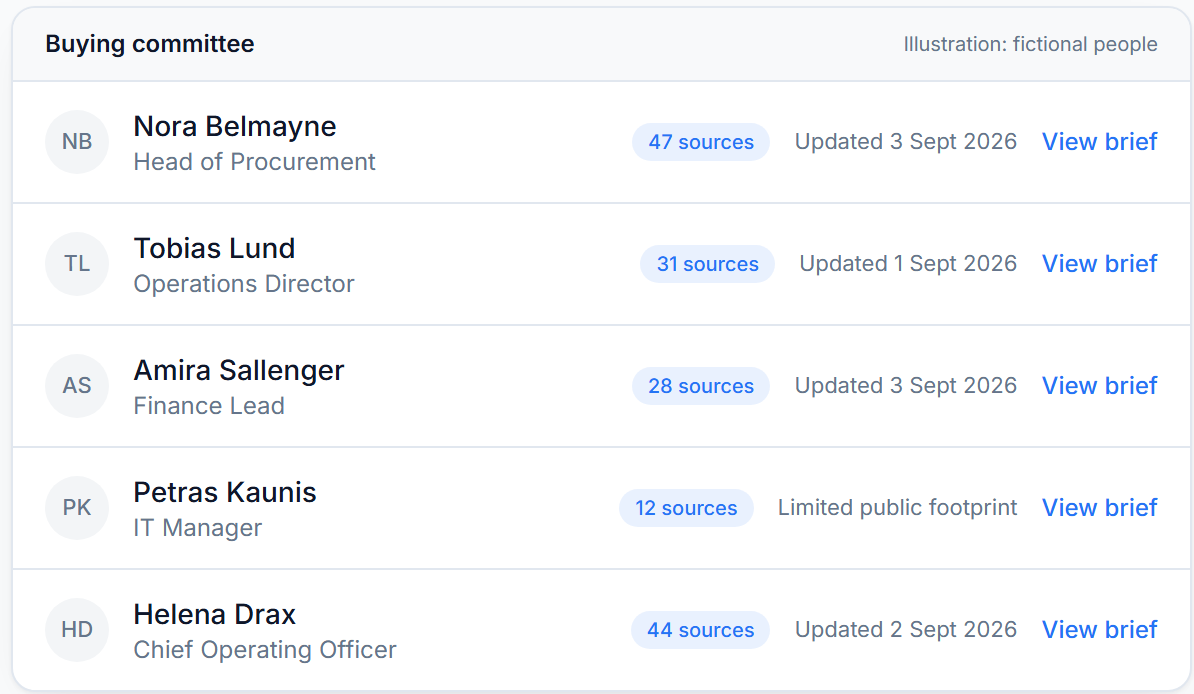
Suppose the meeting has a procurement lead, a finance lead and an IT manager. The respective briefs would reference different things: one talks publicly about process, one about cost control, and one has just about no public footprint, as plainly stated in the brief. The rep can decide who to target for what and who to probe for more.
What it does not do
WhiteBridge gets you ready to meet just one person. We are not batch enrichment, we don't populate the fields in your database, and we don't search for phone numbers or email addresses en masse. We do not join, transcribe or create minutes of your meeting. Nothing runs on autopilot: a brief exists solely because a named user requested it. Likewise, we don't promise a certain number of hours saved, because someone still has to read the brief and formulate questions.
It reads public data only: public profiles on social and professional networking sites, company websites, news reports, publicly available registry data and openly published posts. It can't include anything behind a login or private conversations. You must not use it to make any employment decision about someone. WhiteBridge is not a consumer reporting agency.
Questions
Does it join my sales calls?
No. It's a pre-meeting thing, not a during-meeting thing. It's for the research phase: who's this person, what have they said publicly, and what could you ask them when you meet?
How long does a brief take?
Normally 3 to 5 minutes after clicking. You can leave the record and the brief will be saved to it when ready. A failed generation does not count against your plan.
What data leaves Salesforce?
Just the individual's name, work email, and any profile URL that is saved on the record. The brief is returned and saved against the record. WhiteBridge works under GDPR, and we have a data processing agreement for teams to send us CRM contact data.
How much does it cost?
All plans share a single pool of credits for the entire org and have no per-seat licenses. Pilot is $120/month for 50 briefs, Professional is $299/month for 140, and Enterprise is $470/month for 230. Annual billing is 20% less, and the first 10 briefs are free.
Try it before your next important meeting
If a few deals your team is working on with buying committees define the quarter, WhiteBridge for Salesforce puts this research on the record where the deal lives. Schedule a demo to explore the panel and a sample brief.